Core Puzzle Mechanics
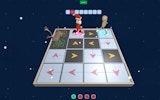
At its heart, Puzzle Quest: The Enchanted Egg is about solving spatial puzzles. Each level presents a series of obstacles, such as blocks and traps, that block the path to the exit. Players must figure out the correct order to move or remove these obstacles. This often involves clicking and dragging items into new positions to create a clear route. The challenge lies in planning several steps ahead, as some moves may block other paths if not done carefully.
Magical Abilities and Allies
The chicken protagonist is not alone. By pressing specific keys on the keyboard, players can summon helpful creatures that automatically take care of certain enemies or barriers. Additionally, the chicken can cast spells that provide extra effects, like breaking fragile objects or slowing down moving hazards. These abilities add a layer of strategy, as players must decide when to use them for maximum benefit. The combination of puzzle-solving and light action keeps the gameplay fresh.
Level Design and Progression
Levels are designed with increasing complexity. Early stages introduce basic mechanics, such as moving a single block. Later levels combine multiple puzzle elements, requiring players to manage several obstacles at once. The game does not use a timer, so players can take their time to study each layout. This thoughtful design makes the game accessible to younger players while still offering a satisfying challenge for adults. Progress is linear, with each completed stage unlocking the next.
Visual Style and Atmosphere
The game features bright, colorful graphics that create a welcoming and playful mood. Characters and environments are drawn in a cartoon style, with smooth animations that make the chicken’s movements feel lively. The cheerful color palette helps reduce frustration during difficult puzzles. The overall presentation is polished but not overly complex, ensuring the game runs smoothly in any modern web browser without lag or loading issues.
Controls and Accessibility
Puzzle Quest: The Enchanted Egg is designed for desktop computers. Players use the mouse to click and drag items, and the keyboard to activate special abilities. The controls are responsive and clearly explained at the start. A full-screen mode is available for a more immersive experience. Since the game runs directly in the browser, there is no need to download or install anything, making it easy to start playing instantly.
✅ Compatibility & Testing
• Desktop (Windows 11, macOS Ventura)
• Mobile (iPhone 14, Samsung Galaxy S23)
• Tablet (iPad Pro, Android tablet)
✅Supported browsers: Chrome, Safari, Edge, Firefox (latest versions)
❌ Not supported: Internet Explorer, older browser versions







Comments
0 comments